Interrupted recording
The device stopped before the recording file could be finalized or its media structures could be completed correctly.
Windows & Linux app · MP4, MOV & MKV recovery · H.264/AVC & H.265/HEVC
Damaged doesn't always mean gone.
Recover damaged MP4, QuickTime MOV and Matroska/MKV recordings with H.264/AVC or H.265/HEVC. REC(over) can handle multiple recoverable problems in the same file, apply the required corrections in sequence, and automatically reanalyze the result during one recovery process.
One file. Multiple problems. One recovery process. Always in the privacy of your own computer.
Free to install and test with a recovery sample. Recover one file with a 1 Full Recovery credit, or unlock the perpetual Full Version for unlimited supported recoveries.

The problem
A family memory, an important recording, professional work, a project, an event or footage that exists nowhere else can become inaccessible after an interrupted recording, sudden power loss, battery removal or damaged storage.
Sometimes the damage is less obvious: the video may play normally in a media player but fail when you try to open it in your video editor. REC(over) examines what is still valid before deciding how the file can be safely recovered.
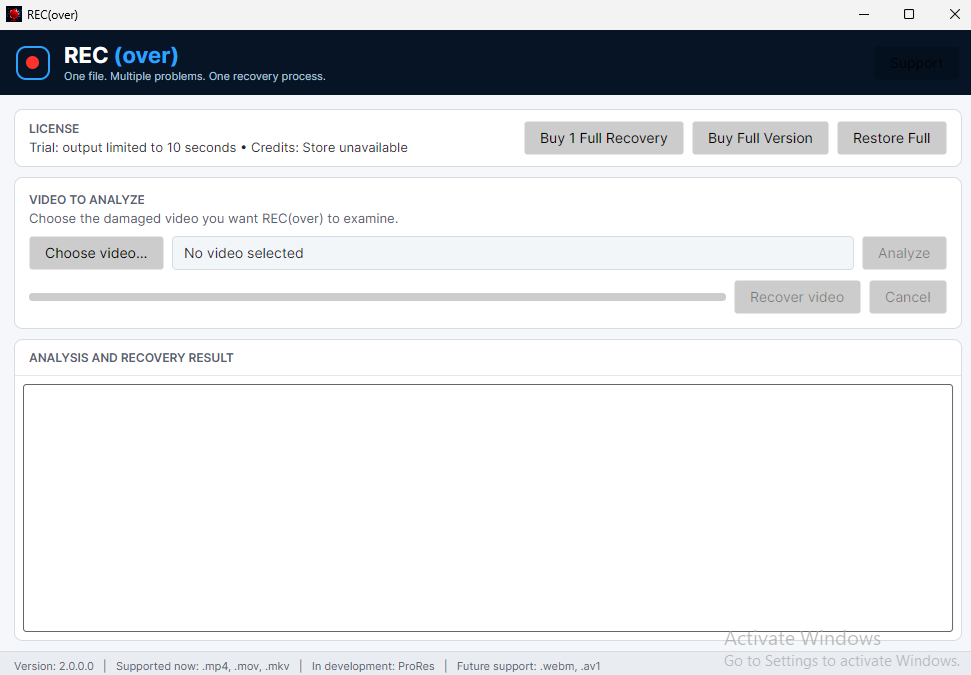
Analyze before you recover
REC(over) inspects MP4, QuickTime MOV and Matroska/MKV container structures, H.264/AVC and H.265/HEVC configuration, media samples, NAL units, Matroska Tracks/Clusters/Cues, random-access points, timing information and supported fragmented MP4 structures.
It identifies the supported recoverable problems it can see, builds an ordered recovery plan, and can automatically reanalyze the reconstructed file when an earlier correction reveals additional damage.
Designed for situations like these
The device stopped before the recording file could be finalized or its media structures could be completed correctly.
The recording ended suddenly because the camera or recorder lost power.
Required container and media structures were not completely written.
The recording still exists, but part of its container or media structure became unreadable.
How REC(over) works
Capabilities
mdat repair strategies.Multi-problem recovery
A damaged recording does not always have just one problem. REC(over) can identify multiple supported recoverable issues in the same file, determine the required corrections and apply them in a safe sequence.
After a recovery stage, REC(over) can automatically analyze the reconstructed file again. If another supported problem becomes visible, recovery continues as part of the same operation. You do not need to save an intermediate file, reopen it and start another recovery manually.
The final result is cumulative, reflecting the corrections performed throughout the complete recovery process.
Private by design
REC(over) analyzes and recovers your videos locally. Your video is not uploaded to a server for analysis or recovery, and there is no cloud processing of the file.
REC(over) does not upload your media or use it to train artificial intelligence models. An Internet connection may be required only for Microsoft Store or Stripe purchases, license and recovery-credit validation, and update checks; the video itself remains on your computer.
No uploads. No cloud processing. Your videos stay on your computer throughout the recovery process.
Validated recovery scenarios
REC(over) recovery has been validated for MP4, QuickTime MOV and Matroska/MKV files containing H.264/AVC or H.265/HEVC video, including files that contain more than one supported recoverable problem. The detailed scenarios below document the foundational MP4/H.264 validation set. The same recovery architecture also covers MP4/H.265, MOV/H.264, MOV/H.265 and the validated MKV scenarios summarized below.
Development IDs such as PV001 are internal codes used to identify individual validation scenarios during REC(over) development.
| Development ID | Validated scenario | REC(over) behavior |
|---|---|---|
| PV060 | Segment declares a size larger than the physical MKV data. | Restores the Matroska Segment boundary while preserving the recording. |
| PV061 | Segment declares a size smaller than the preserved Matroska content. | Restores the Segment boundary and returns preserved top-level elements to the valid structure. |
| PV062 | Damaged Cluster header with media still preserved. | Repairs the Cluster structure without re-encoding the preserved media. |
| PV063 | Damaged Cues/index header with SeekHead evidence preserved. | Restores the Matroska index structure using the remaining container evidence. |
| PV064 | Damaged H.264/AVC media block. | Removes the unsafe interval through the next safe video point and keeps corresponding audio synchronized. |
| PV065 | Damaged H.265/HEVC media block. | Recovers around the damaged HEVC interval using a confirmed safe recovery point. |
| PV066 | MKV with two video tracks and three audio tracks. | Preserves multiple video/audio tracks, Track IDs, codecs, names, languages and synchronization. |
| PV067 | Multiple Matroska problems in the same multitrack file. | Serializes structural and media corrections, reanalyzes automatically and produces one cumulative recovery result. |
| Development ID | Technical name | Description | REC(over) behavior |
|---|---|---|---|
| PV001 | damaged_mdat_size_too_large_preserved_moov |
The video file reports an incorrect size and may not open properly. | Repairs the file structure and restores the available video and audio. |
| PV002 | damaged_mdat_size_too_small_preserved_moov |
Part of the recording appears to be missing because the file reports the wrong size. | Corrects the file information and restores the complete available recording. |
| PV003 | damaged_mdat_type_invalid_preserved_moov |
The recording data is present, but the file no longer identifies it correctly. | Recognizes the preserved media and rebuilds a playable file. |
| PV004 | lost_beginning_preserved_mdat_moov |
The beginning of the file is missing or damaged. | Recreates the missing beginning and preserves the remaining recording. |
| PV011 | missing_moov_rebuild_from_mdat_avc |
The file has lost the information needed to organize its video and audio. | Rebuilds a playable video when the image data can still be identified. Audio may be unavailable, and REC(over) displays a warning before recovery. |
| PV012 | truncated_moov_preserved_critical_metadata |
Important information at the end of the file is incomplete. | Uses the remaining information to create a playable file. Audio may be unavailable if its information was lost. |
| PV013 | damaged_moov_declared_size_too_large_preserved_data |
The file incorrectly reports that its internal information is larger than it really is. | Corrects the file structure and restores normal playback. |
| PV014 | damaged_moov_declared_size_too_small_preserved_data |
The file ignores valid information that is still physically present. | Restores access to the preserved information and rebuilds the playable file. |
| PV015 | damaged_ftyp_declared_size_too_large_preserved_moov_mdat |
The file has a badly damaged opening and may not be recognized as a valid video. | Recreates a compatible opening without altering the preserved recording. |
| PV016 | missing_ftyp_preserved_moov_mdat |
The video is missing the identification normally found at the beginning of the file. | Adds the required identification and restores the file as a standard MP4. |
| Development ID | Technical name | Description | REC(over) behavior |
|---|---|---|---|
| PV005 | damaged_avc_sample_nal_size_preserved_moov |
One part of the video contains invalid or unreadable data. | Removes the unsafe section and preserves the portions that can still be played correctly. |
| PV006 | damaged_avc_long_sample_interval_preserved_moov |
A longer section of the recording is damaged. | Skips the damaged interval and joins the recoverable portions into a new file. |
| PV007 | damaged_avc_multiple_sample_intervals_preserved_moov |
Several separate parts of the video are damaged. | Removes the affected sections and preserves all remaining playable portions. |
| PV008 | damaged_avc_sparse_samples_preserved_moov |
Small damaged points are scattered throughout the recording. | Filters out the unsafe areas and keeps the independently playable sections. |
| PV009 | damaged_avc_mixed_intervals_and_sparse_samples_preserved_moov |
The video contains a mixture of isolated damage and longer damaged sections. | Combines the recoverable portions into a new playable file. |
| PV010 | damaged_avc_dense_samples_preserved_moov |
A heavily damaged section contains many unreadable frames. | Discards that section and preserves the usable video before and after it. |
| Development ID | Technical name | Description | REC(over) behavior |
|---|---|---|---|
| PV017 | damaged_stco_offset_too_large |
Part of the file points to a location that does not exist. | Ignores the invalid reference and preserves the media that can still be located safely. |
| PV018 | damaged_stco_offset_before_mdat |
Part of the file points to the wrong area. | Removes the affected section and rebuilds the recording from valid data. |
| PV019 | damaged_stco_offset_inside_mdat_non_sample |
The file points to the middle of unrelated data instead of a real video or audio section. | Avoids using the false location and keeps only verified media. |
| PV020 | damaged_stsz_sample_size_too_large |
One part of the recording is reported as being impossibly large. | Discards the invalid entry and preserves the remaining playable content. |
| PV021 | damaged_stsz_sample_size_zero |
One part of the recording is incorrectly reported as empty. | Removes the invalid entry and rebuilds the file with the usable content. |
| PV022 | damaged_stsc_first_chunk_too_large |
The file refers to a section that does not exist. | Reconstructs the recording using the sections that can still be identified safely. |
| PV023 | damaged_stsc_samples_per_chunk_zero |
The file contains contradictory information about where its media is stored. | Ignores the invalid information and rebuilds the playable portions. |
| PV024 | damaged_stsc_sample_description_index_zero |
Part of the media no longer has valid information describing how it should be read. | Preserves the sections whose format can still be identified correctly. |
| PV025 | damaged_stts_sample_count_too_large |
The file reports more video frames than it actually contains. | Corrects the timeline and rebuilds the file from the frames that really exist. |
| PV026 | damaged_stts_sample_delta_zero |
Part of the recording has invalid timing information. | Rebuilds a valid timeline for the media that can still be recovered. |
| PV027 | damaged_stsz_sample_count_too_large |
The file reports more media sections than are physically present. | Uses the real available sections and creates a consistent playable file. |
| PV028 | damaged_stco_entry_count_too_large |
The file reports more storage locations than its internal data actually contains. | Corrects the inconsistent information and restores access to the recording. |
| Development ID | Technical name | Description | REC(over) behavior |
|---|---|---|---|
| PV029 | damaged_first_idr_next_idr_preserved |
The first usable starting frame is damaged. | Starts the recovered video at the next safe point. |
| PV030 | damaged_sample_immediately_after_idr |
Damage immediately after a valid starting frame makes the following frames unusable. | Preserves the safe beginning and resumes the video at the next reliable point. |
| PV031 | multi_slice_idr_preserved |
A keyframe uses a more complex internal structure than usual. | Recognizes the complete keyframe and preserves it as a valid recovery point. |
| PV032 | truncated_final_avc_nal_preserved_moov |
The last frame of the recording is incomplete. | Removes the incomplete ending and finishes the recovered video at the previous complete frame. |
| PV033 | false_sps_header_before_valid_avc_stream |
Damaged data resembles valid video information and could cause a false recovery start. | Ignores the false information and uses the real video data. |
| PV034 | false_pps_header_before_valid_avc_stream |
Invalid data resembles part of the video configuration. | Rejects the false data and rebuilds the video from the valid configuration. |
| PV035 | false_idr_header_before_valid_avc_stream |
Damaged bytes resemble a valid starting frame. | Ignores the false frame and begins recovery at the first genuine safe point. |
| PV036 | truncated_idr_with_valid_slice_prefix_before_valid_avc_stream |
An incomplete frame looks valid at first but cannot actually be decoded. | Rejects the incomplete frame and continues searching for a complete recovery point. |
| Development ID | Technical name | Description | REC(over) behavior |
|---|---|---|---|
| PV037 | damaged_video_sample_preserves_single_audio_track |
The video is damaged, but its audio track remains available. | Removes the damaged video section and keeps the remaining audio synchronized with the recovered image. |
| PV038 | damaged_video_sample_preserves_two_audio_tracks |
The video is damaged in a file containing two audio tracks. | Preserves both audio tracks and keeps them aligned with the recovered video. |
| PV039 | damaged_video_sample_preserves_two_audio_tracks_different_timescales |
The file contains two audio tracks that use different timing systems. | Preserves both tracks and keeps each one correctly synchronized. |
| PV040 | damaged_audio_chunk_preserves_video_track |
A small section of audio is damaged while the video remains intact. | Removes only the damaged audio section and preserves the complete video. |
| PV041 | damaged_first_audio_track_preserves_second_audio_and_video |
One audio track is damaged, while another audio track and the video remain healthy. | Repairs only the affected track and preserves the other audio track and video unchanged. |
| Development ID | Technical name | Description | REC(over) behavior |
|---|---|---|---|
| PV042 | damaged_single_fragment_mdat_header |
A segmented MP4 recording contains one damaged section. | Repairs the damaged section and restores the complete video and audio. |
| PV043 | damaged_middle_fragment_mdat_header |
A section in the middle of a segmented recording is damaged. | Repairs the affected section while preserving the surrounding recording. |
| PV044 | damaged_first_and_last_fragment_mdat_headers |
The beginning and ending sections of a segmented recording are both damaged. | Repairs both sections in one recovery and restores the complete available recording. |
Try first. Pay only for what you need.
REC(over) lets you analyze a supported damaged file and create a short recovery sample first. If the result is what you need, choose a single recovery credit or the perpetual Full Version.
| Feature | Free version | 1 Full Recovery | Full Version |
|---|---|---|---|
| Complete file analysis | Yes | Yes | Yes |
| Recovery report | Yes | Yes | Yes |
| Short recoverable sample | Yes | Available before purchase | Available before purchase |
| Complete recovery output when possible | No | One file per credit | Unlimited supported files |
| Payment model | Free | Low-cost credit | Pay once, use whenever needed |
| Subscription | No | No | No |
One file to recover? Pay for one. Need REC(over) again and again? The Full Version is a perpetual license for any number of supported recoveries.
Safe by design
REC(over) never overwrites the source file. Recovered content is written to a new output file selected by the user.
All analysis and recovery are performed locally on your Windows or Linux computer. Files are not uploaded for processing and there is no cloud recovery stage.
Your media is not uploaded or used by REC(over) to train artificial intelligence models.
Always in the privacy of your own computer.
Current recovery support
REC(over) currently supports these six container and video-codec combinations:
Recovery always depends on enough valid structure and media data remaining in the damaged recording for safe reconstruction.
More formats can come later. Current development has completed the planned MP4, MOV and MKV recovery families. Future expansion can target additional legacy and professional media formats.
FAQ
No. Recovery depends on how much valid structure and media data remain available.
Never. It creates a separate recovered output file.
REC(over) can serialize multiple supported corrections into one recovery process and automatically reanalyze the reconstructed file when needed. The final result is cumulative.
Yes. REC(over) supports Matroska/MKV with H.264/AVC and H.265/HEVC, including validated recovery with multiple video and audio tracks.
It lets you verify the recovery result before deciding whether to buy one complete recovery or the perpetual Full Version.
It is a low-cost recovery credit for one complete, successfully validated recovery. Purchases are handled by Microsoft Store on the Windows Store distribution and by Stripe on Linux. If you only need one file, you do not have to buy the perpetual license.
A perpetual license. Pay once and recover any number of supported files whenever you need REC(over). No subscription.
Only for Microsoft Store or Stripe purchases, licensing, recovery-credit validation and update checks. Video analysis and recovery are performed locally; your video is not uploaded for processing.
No. REC(over) does not upload your media or use it to train artificial intelligence models.
Available for Windows and Linux
Install REC(over) free, analyze a supported damaged recording and create a short recovery sample before deciding whether to purchase a complete recovery.
Microsoft Store
Install REC(over) through Microsoft Store. Purchases, licensing and updates are managed through your Microsoft Store distribution.
Get REC(over) for WindowsDirect distribution
Download the official Linux package directly from tioleo.dev. Direct purchases and licensing are securely processed through Stripe.
Go to Linux downloadSupport
For REC(over) support, questions or recovery feedback, contact: